
Git Interview Questions (Beginner → Advanced) 🚀
What is GIT and why it is used for ?
Git is a distributed version control system used to track changes in source code and manage different versions of files. It allows developers to work on branches independently, maintain complete history locally, collaborate with teams, and revert or recover changes when required.
What is working Directory ?
In this stage git is only aware of having files in the project. It will not track these files until we commit those files.
What is Staging area?
The staging area is like a rough draft space, it's where you can git add the version of a file or multiple files that you want to save in your next commit. In other words, in the next version of your project.
What is Repository?
Repository in Git is considered as your project folder. A repository has all the project-related data. It contains the collection of the files and also history of changes made to those files
Working Directory
       |
    git add
       ↓
Staging Area
       |
   git commit
       ↓
Git Repository
What is a commit?
A commit is a snapshot of the staged changes saved in the Git repository. Each commit has a unique commit ID, usually represented by a SHA hash, and contains information such as the author, timestamp, message, and parent commit.
What is local Repo?
This is the copy of the repository that lives on your computer.
Your working directory (the actual files you edit).
The staging area (index).
The local commit history (your
.gitfolder).
What is remote Repo?
This is the copy of the repository hosted on a git
Alternatives for git ?
We have SVN , GitLab , BitBucket
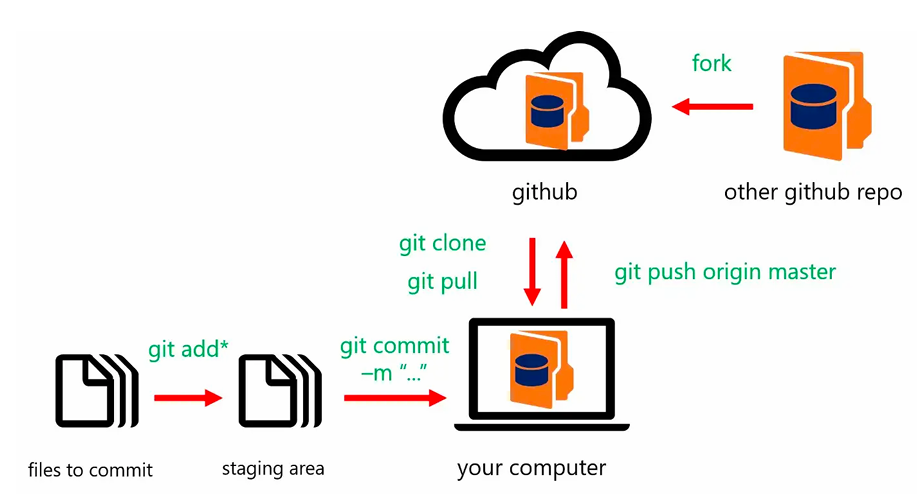
Commands to remember
yum install git -y                    #To install git in the server
git -v                                #To get the git version
git init .                            #To intialize git in pwd
git add <fileName>                    #To add a file for tracking
git add .                             #To track all files including hidden
git add *                             #To track all files
git commit -m "Commit message"        #To commit all files wch r in staging
git log                               #To see commit history
git log -2                            #To see history of last 2 commits
git show commit-id                    #To get git commit details
git config user.name "username"       #To config our username
git config user.email "email"         #To config our mail
What is .git folder ?
Hidden folder created when you run
git init.Contains all metadata, commit history, branches, and configuration.
Deleting this removes git tracking
Commands To remember
git rm --cached <filename1><filename2> #To untrack the changes after commit
git restore <filename>                 #To go back to last commit changes
git restore --staged filename          #Just un stage the changes
git reset --hard HEAD~1                #To delete latest commit & changes
git reset --soft HEAD~1                #To delete only latest commit
git reflog                             #To get record of all changes
git cherry-pick <commitId>             #To get the deleted data and commit
git revert <commitid>             #To undo changes of a commit & add commit
git merge <branchName>            #To Merge the changes from one to other
git rebase main                   #To get the changes on topof the feature
git fetch <branch>                #To know the whether any latest changes
REBASE:
feature commits
      ↓
replayed on top of latest main
      ↓
clean linear history


MERGE:
feature + latest main
      ↓
histories combined
      ↓
may create merge commit
What is .gitignore ?
This is a file where we can mention which files should be ignored by git all the time , the files mentioned in this wont be tracked , committed , staged
git restore and git rm --cached ?
git rm means , if you we have committed a file and dont want to track then we use this
git restore means , un stage the files or else go back to last commit changes
Git Branches ?
A branch represents an independent line of development The default branch is master,Allows you to work on different features or changes to your code independently
git commit --amend -m "New message" #To change details for recent commit

git branch                             #To see the list of branches
git branch <branchName>                #To create a new branch
git checkout <branchName>              #To switch to a branch
git checkout -b <branchName>           #To create and switch to the branch
git branch -d <branchName>             #To delete a branch
git branch -D <branchName>             #To delete a branch forcefully
Difference between -d and -D ?
The -d option will delete the branch only if it has already been pushed and merged with the remote branch
What is Git stash?
Git stash allows you to temporarily set aside uncommitted changes, enabling you to work on something else and return to them later.
git stash                        #To delete changes temporarily
git stash apply                  #To get the changes back
git stash list                   #To get list of stashes
git stash clear                  #To clear all stashes
git stash save "message"         #To save stash along with message
git stash drop                   #To delete latest stash
git remote add origin repo-url          #To add local repo to remote
git push -u origin <branchName>         #To push code from local to remote
git push -u origin <br1> <br2>          #To push to multiple branches
git clone <repo-url>                    #To get code from central to local
git pull origin <branchName>            #To get the latest changes
Git branching strategies?
Git Flow:
This is a structured approach with multiple branches like main, develop, feature, release, and hotfix. It’s mainly used in projects with planned releases, but it can be complex and slower for frequent deployments.
GitHub Flow:
This is a simpler model where developers create feature branches from main, raise pull requests, and merge after review. It supports continuous integration and is widely used in modern DevOps practices.
GitLab Flow:
This extends GitHub Flow by adding environment-based branches like staging and production, making it useful when managing multiple deployment environments.
Trunk-Based Development:
In this approach, developers frequently merge small changes directly into a single main branch. It’s best suited for teams with strong CI/CD pipelines and enables faster delivery with fewer merge conflicts.
What is the difference between Git and centralized version control systems?
The main difference between Git and centralized version control systems is that Git is distributed, while centralized systems like SVN or CVS rely on a single central server.
In Git, every developer has a full copy of the repository, including the entire history, so you can commit, view logs, and branch locally without needing network access. This makes operations faster and allows offline work.
What is the difference between Git, GitHub, and Bitbucket?
Git is a distributed version control system it’s the tool that tracks code changes, supports branching, and lets developers collaborate.
GitHub and Bitbucket are hosting platforms for Git repositories. They provide a central place to store code online, collaborate through pull requests, and integrate with CI/CD pipelines.
What is a merge conflict?
A merge conflict occurs when Git cannot automatically combine changes from two branches
How do you resolve merge conflicts?
To resolve a merge conflict, I open the conflicted files, look for the conflict markers (<<<<<<<, =======, >>>>>>>), and decide which changes to keep — mine, theirs, or a combination
what is git rebase?
git rebase is a Git command that moves or reapplies commits from one branch onto another, creating a linear history instead of a merge commit
what is git blame?
git blame is a command that shows who last modified each line of a file and in which commit. It’s used to trace the history of changes line by line
git blame app.py
What is HEAD in Git?
In Git, HEAD is a pointer that represents your current position in the repository.
How do you recover a deleted branch?
If a branch is deleted, you can usually recover it because Git keeps a record of all commits in the reflog
What is git tag ?
A Git tag is a pointer to a specific commit. It’s often used to mark important commits, like release versions. Tags can be lightweight (just a commit reference) or annotated (with metadata like author, date, and message)
What is git clone and git fork?
Suppose if u have acccess the remote repo u clone and u push the changes, where as if u dont have then u fork and aske for pull request to make changes
What is git fetch?
git fetch downloads the latest changes and remote-tracking information from the remote repository without modifying my current working branch.
What is git pull?
git pull fetches changes from the remote repository and then integrates them into the current branch. By default, this is generally a fetch followed by a merge.
git pull
   =
git fetch
   +
git merge
What is git merge?
git merge combines the changes from one branch into another branch. Depending on the commit history, Git may perform a fast-forward merge or create a merge commit.
git checkout main
git merge feature
What is git rebase?
Rebase moves or reapplies my branch commits on top of another branch. It creates a cleaner, linear history by replaying my commits instead of creating a merge commit.
git checkout main
git merge feature
Merge combines two branch histories and may create a merge commit, preserving the original history. Rebase rewrites my branch history by replaying my commits on top of the latest target branch, resulting in a cleaner linear history.
I generally use rebase for keeping a feature branch up to date, if the team follows a rebase workflow. For shared branches, I avoid rebasing already-published history unless the team explicitly allows it.
What is git diff?
git diff shows differences between different states of the repository.
What is git bisect?
git bisect is used to identify which commit introduced a bug. It performs a binary search between a known good commit and a known bad commit.
What is a fast-forward merge?
A fast-forward merge occurs when the target branch has no new commits after the feature branch was created. Git can simply move the target branch pointer forward without creating a merge commit.
What is Branch Protection?
Branch protection is a repository-level configuration used to prevent unauthorized or unsafe changes to important branches such as main or production. It allows us to enforce rules like Pull Request approval, successful CI checks, and restrictions on direct pushes or force pushes.
What would you do if a developer accidentally committed a password or secret to Git?
First, I would treat the secret as compromised and immediately rotate or revoke it. Removing the secret from the latest commit is not enough because it may still exist in ]]Git history, CI logs, caches, or clones.